
 Choose mobile
 Login
 Signup
Desktop VisualizeR android apk free download

| Name | Desktop VisualizeR |
| Category | tools, utilities |
| Resolution | multi |
| Type | Android 1.5 Cupcake |
| Size | 748 KB |
| Rating | 2/5 from 77 ratings |
| Rate this app: | |
| 2740 downloads | |
Description:
ANDROID:
1.5 and up
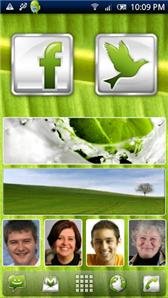
"Desktop VisualizeR makes shortcuts or widgets for your home screen.
Desktop VisualizeR(DVR) makes shortcuts or widgets with the image specified or the icon of another application for the Home screen. You can change the icon when you create a shortcut.
Don't know the exact size for widget images? Purchase DVRImageCrop or DVRImageSlicer. Some of widgets in screen shots are created by these add-ons. Please try.
Usage:From Home screen press menu->add->Widgets or Shortcuts->Desktop VisualizeR
* The crash log will be sent to us using our web server through the internet.
** Important changes in 1.2.7
* We have removed CALL_PHONE permission. So, DVR can not make direct phone call with tapping widgets or encoded shortcuts anymore. But DVR will always launch dialer instead. If you want to make direct phone call, please install DVRDirectCall.
** Changes in 1.2.3
* From this version, we decided to embed ads(Added permission for ads). To hide ads, please configure icon by our paid add-ons or icon packs. To confirm whether ads is hidden or not, please see ""No Ads"" status in the Settings menu.
* Now application list caching is included. You do not need DVRAppListCache anymore. If you do not need caching, please make OFF the ""Cache application names"" option in the Settings.
* Now lists all homes, including that seems to register create shortcut broadcast receiver dynamically, when creating shortcuts.
* Added widget size information dialog(menu > More > Widget info).
* Refactored for future enhancement.
* New widget icons.
* More widget sizes(3x4, 4x3). To enable these sizes, please change settings by ""Widget Usage"" in the Settings menu."


 Download directly on your phone by scanning this QR code
